
Tools & Reporting
for School Admins
Built to give you control, clarity, and confidence
ePlatform’s admin tools are designed for librarians, teachers and support staff who manage student reading access. From assigning books to tracking usage, you get the oversight you need, without the hassle.
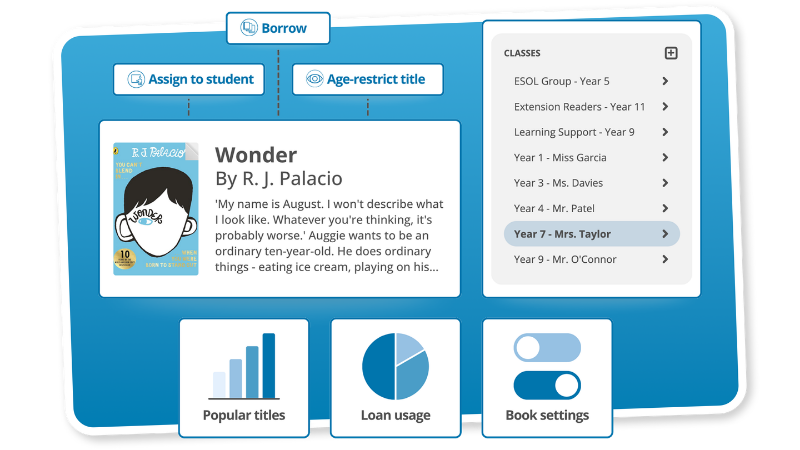
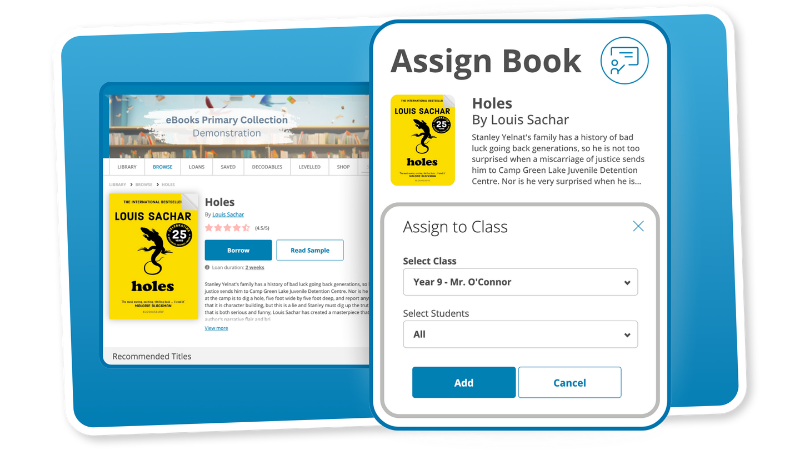
Assign Books with Ease
Push the right titles to the right readers
Assign any eBook, Audiobook, or Decodable Reader directly to students, groups, or whole classes, all in just a few clicks. This feature makes it easy to personalise reading at scale, whether you're setting a class novel, assigning a specific level for support, or recommending titles to match student interests. Books appear instantly in each reader’s account for seamless access.
Want to explore Book Assignments? Schedule a Demo
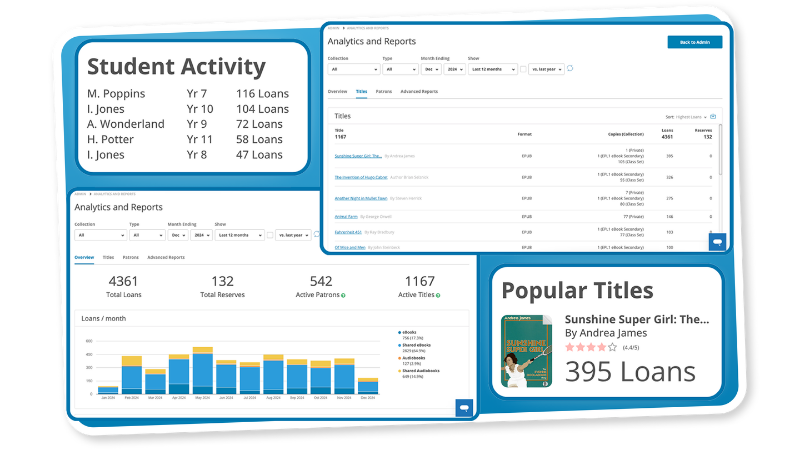
The Reports Dashboards
Know what’s being read, and where to focus
The admin dashboards give you clear, real-time insights at the school, class, and student level. Track borrowing trends, reading time, and engagement across content types or year levels. Use the data to monitor progress, identify gaps, inform leadership reports, and strengthen school-wide literacy planning with data-backed decisions that support every learner.
Want to explore Reports and Analytics? Join a Walkthrough
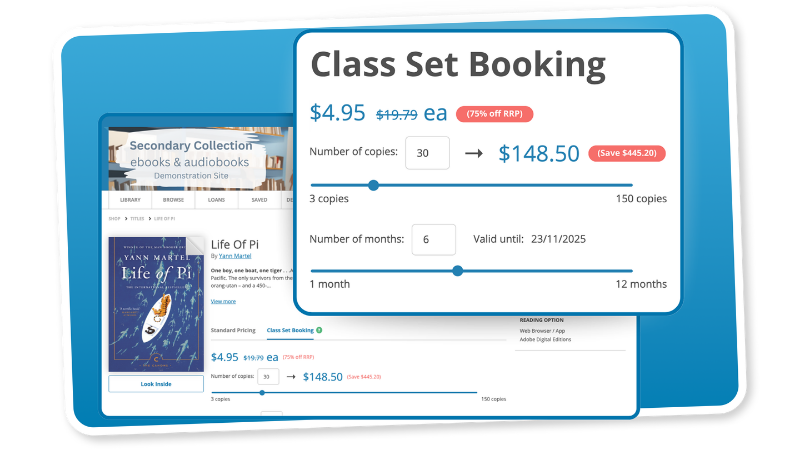
Class Sets for Shared Reading
Share the same book with multiple students
With Class Sets, every student can access the same title simultaneously, ideal for novel studies, group discussions, or whole-class reading. No holds or wait times mean teachers can plan confidently and get students reading straight away. The collection also includes thousands of free titles from Project Gutenberg, offering even more flexibility at no extra cost.
Want to explore Class Sets? Schedule a Demo
Restrict Titles for Safe Browsing
Keep your digital library safe and appropriate
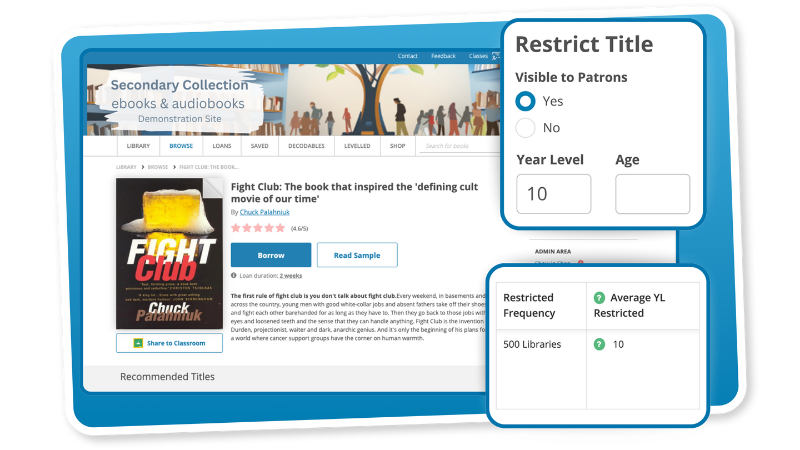
Flexible access controls let you manage what students see by year level or age group, making it easy to ensure content is age-appropriate across your school. You can apply your own rules or use recommended filters based on how other schools have classified the same titles, giving you clarity and confidence when tailoring access.
Want to explore Title Restrictions? Join a Walkthrough
Custom Home Page Collections
Highlight key titles and guide discovery
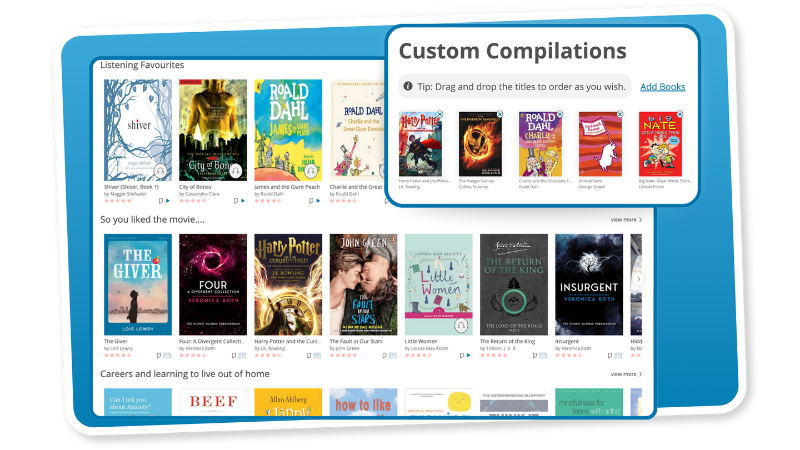
Turn your school’s digital library homepage into a curated discovery space. Feature staff picks, highlight seasonal reads, or build collections tailored to different year levels and subjects. With full control over what’s showcased, your team can promote age-appropriate content, spotlight key titles, and help students discover their next great read.
Want to explore Custom Compilations? Schedule a Demo
See Admin Tools in Action
Get a tailored walkthrough of our Admin features
Want to explore how our admin tools can work in your school? Book a free demo to see how ePlatform supports your staff, engages your students, and simplifies digital reading for everyone.

Frequently Asked Questions
School Staff Have Full Control of the Digital Library
ePlatform provides a comprehensive suite of administrative controls designed to give school staff (librarians, teachers, and administrators) full oversight and flexibility over their digital library. Key features include the ability to assign eBooks, Audiobooks, or decodable readers directly to individual students, groups, or whole classes, enabling targeted reading assignments. Staff can also restrict titles by year level or age group, ensuring content appropriateness. Powerful reporting dashboards offer real-time insights into borrowing trends, reading time, and engagement at school, class, and individual student levels, supporting data-driven literacy planning. Additionally, staff can customise their school's ePlatform homepage with custom collections to highlight specific titles or themes, and manage loan periods and maximum simultaneous loans.
Free & Cost-Effective Titles For Class Sets
Simultaneous loans, referred to as "class sets" on ePlatform, are a valuable feature that allows multiple students to access and read the same eBook or Audiobook concurrently. This is ideal for whole-class novel studies, group discussions, or specific assignments where every student needs immediate access to a particular title.
Schools can easily create these class sets by purchasing additional copies of titles through the ePlatform shop. These purchases are highly cost-effective, with discounts of up to 75% compared to buying individual copies. The pricing is flexible, as it adjusts based on your chosen loan duration and the number of copies you need. This gives schools precise control over their budget and resource allocation. Furthermore, ePlatform also includes thousands of free, simultaneous-use titles from Project Gutenberg, offering even more flexibility and cost savings for commonly studied classics or public domain works. This ensures that whether purchasing or utilising free resources, schools can reliably provide a required number of students with a book at the same time, making lesson planning more predictable and supporting seamless classroom integration.
You're viewing our website for: Greece
Switch to the United States siteTry ePlatform for Free
Explore our digital library, student tools, and admin features in a guided demo for your school.
Have questions? Check out our FAQ, or Contact Us. We’re here to help.
Reading Support Tools for Every Student
Smarter Reading Tools for Today’s Classrooms
ePlatform is designed to meet your school’s goals, engaging more students, supporting diverse reading needs, and simplifying teacher workflows. With tools to personalise reading, manage classes, and track literacy progress, ePlatform helps every learner thrive.
The Settings Wizard
Let students take control of how they read
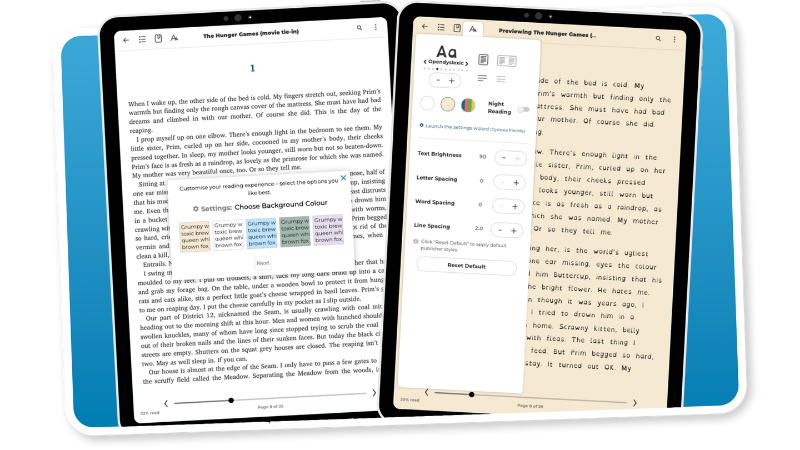
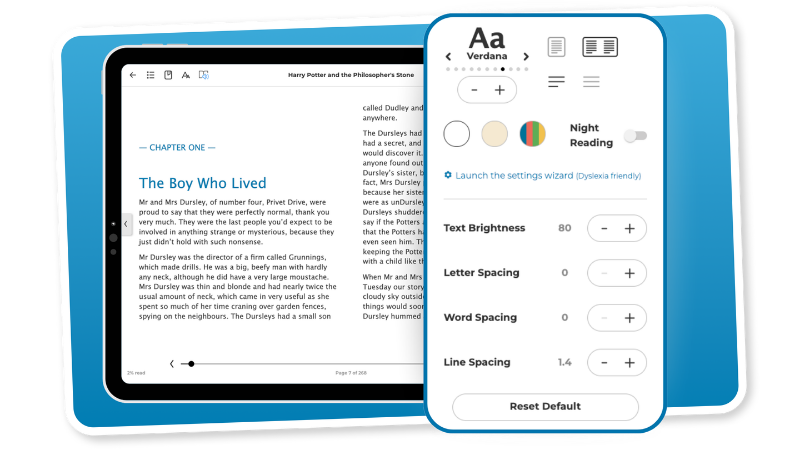
The Settings Wizard lets students personalise how eBooks appear, adjusting font, text size, spacing, colour themes, and more. These simple controls make reading more comfortable for all learners, especially those with dyslexia, visual stress, or learning differences. Because students manage their own settings, teachers don’t need to configure anything, making inclusive reading easy at scale.
Want to explore the Settings Wizard? Schedule a Demo
Immersive Reader
Make reading accessible for every student
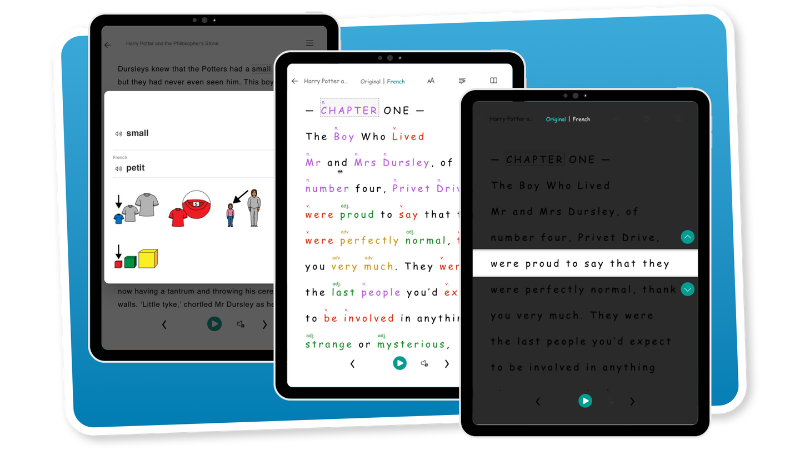
The Immersive Reader makes text more accessible, especially for EAL learners, neurodivergent students, or those needing support. Students can translate into 100+ languages, highlight syllables, identify parts of speech, focus on one line, and use the picture dictionary to clarify words. These tools reduce cognitive load and support better comprehension, all built into the reading experience.
Want to explore the Immersive Reader? Join a Walkthrough
Notes and Highlights
Time to study? Annotate important passages
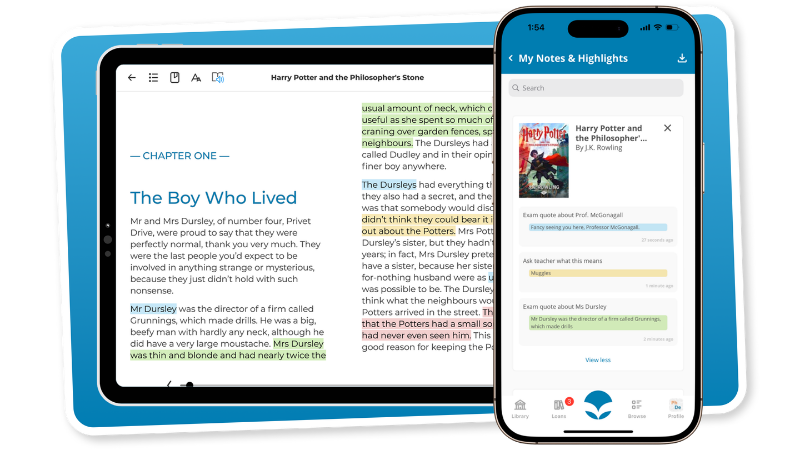
Students can highlight key phrases, add digital notes, and easily revisit what stood out to them. These tools help learners actively engage with texts, reflect on their thinking, and improve comprehension. Whether used for study, discussion prep, or tracking progress over time, Notes and Highlights are a simple but powerful way to build deeper reading habits.
Want to explore Notes and Highlights? Schedule a Demo
Customise Your Audiobooks
Let students customise their listening experience
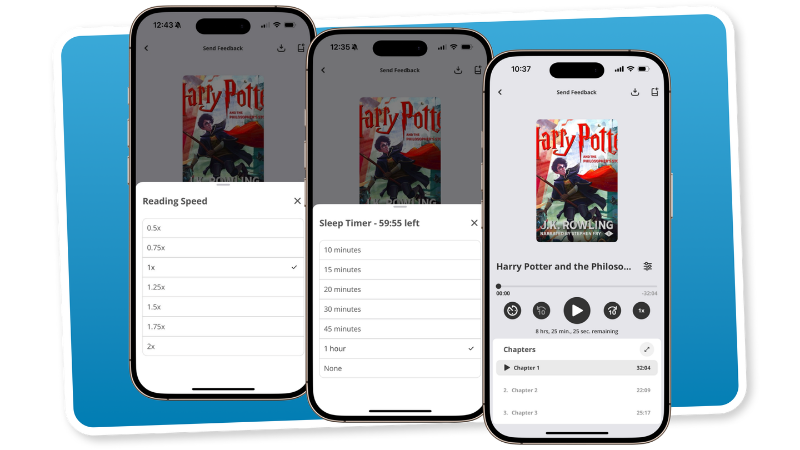
ePlatform’s Audiobook player puts students in control of how they listen. They can adjust playback speed, jump between chapters, skip forward or back in 10-second increments, and choose the voice settings that work best for them. These flexible controls support different learning needs — whether students are building fluency, learning English, or simply prefer to listen on the go.
Want to explore Audiobook Settings? Join a Walkthrough
See Reading Support in Action
Get a tailored walkthrough of our support features
Want to explore how our reading support features can work in your school? Book a free demo to see how ePlatform supports your staff, engages your students, and simplifies digital reading for everyone.
Frequently Asked Questions
Settings Wizard, Immersive Reader, Notes & Highlights
ePlatform's eBooks come with a suite of features designed to enhance the reading experience and support various learning styles. Students can use the Settings Wizard to adjust display settings including font type (with dyslexia-friendly options), font size, spacing between letters, words, and lines, and background colour to suit their preferences and reduce visual stress. Another helpful tool is the Immersive Reader, which includes a built-in picture dictionary to define words, the ability to translate text into over 150 languages, line focus, and parts of speech identification (including syllables), further aiding comprehension. Additionally, all eBooks allow students to make notes and highlights to aid comprehension and help prepare for exams or assessments.
Fully Customisable Listening Experience
ePlatform's Audiobooks offer immersive listening experiences with features designed for flexibility and comprehension. Students can adjust the playback speed (multi-speed playback) to match their processing needs or listening preferences. A sleep timer is also available for bedtime listening, as well as the ability to skip forwards or back in 10-second increments, or select a specific chapter. Crucially, listening progress is automatically saved and synchronised across all devices, meaning students can pick up exactly where they left off, whether switching from a laptop to a tablet or mobile phone. Students can also bookmark their place and download titles for offline listening, ensuring access even without an internet connection.
Accessibility Features for Every Learner
ePlatform is specifically designed with features to support reluctant readers and students with learning differences, creating a more accessible and engaging reading environment. For students with dyslexia, the platform offers highly customisable settings such as dyslexia-friendly fonts, adjustable letter and line spacing, and various background colours to minimise visual strain.
Audiobooks are a game-changer, allowing students to access grade-level content through listening, bypassing decoding challenges while still building vocabulary and comprehension. By offering diverse formats and customisable settings, ePlatform empowers every student, including English Language Learners, to find a comfortable and effective way to engage with reading.
You're viewing our website for: Greece
Switch to the United States siteTry ePlatform for Free
Explore our digital library, student tools, and admin features in a guided demo for your school.
Have questions? Check out our FAQ, or Contact Us. We’re here to help.
Decodable Readers Program Features
Designed for phonics-based classrooms
The SuperLit Readers program includes more than just decodable books. With games, worksheets, voiceovers and read-along tools, students get multiple ways to engage with the same text, while teachers get everything they need to reinforce phonics instruction. It’s a complete toolkit for structured literacy in the early years.
A Clear Scope and Sequence
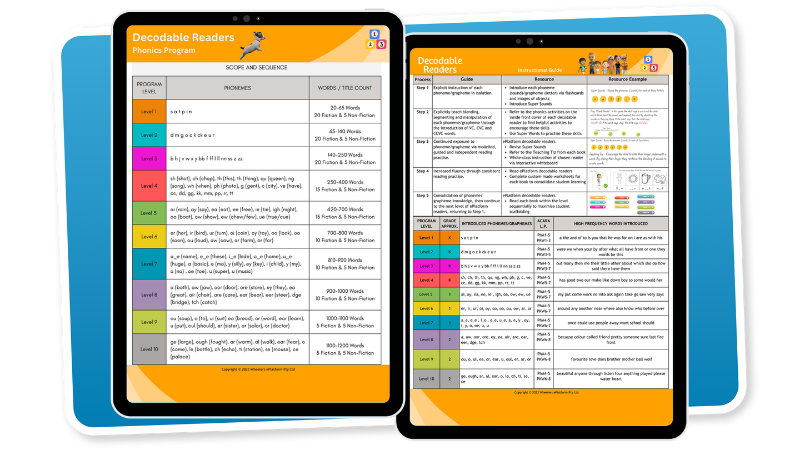
10 structured levels, aligned to synthetic phonics
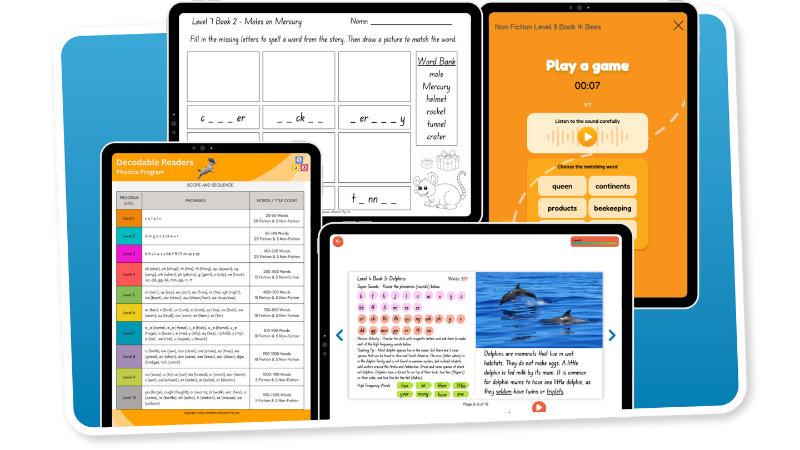
The SuperLit Readers program follows a clear scope and sequence, progressing across ten decodable levels. Each level introduces specific phoneme-grapheme correspondences and reinforces them through multiple texts. Fiction and non-fiction options allow teachers to target reading goals while building content knowledge.
Voiceover and Guided Read-Along
Let Students Listen, Read, and Follow Along
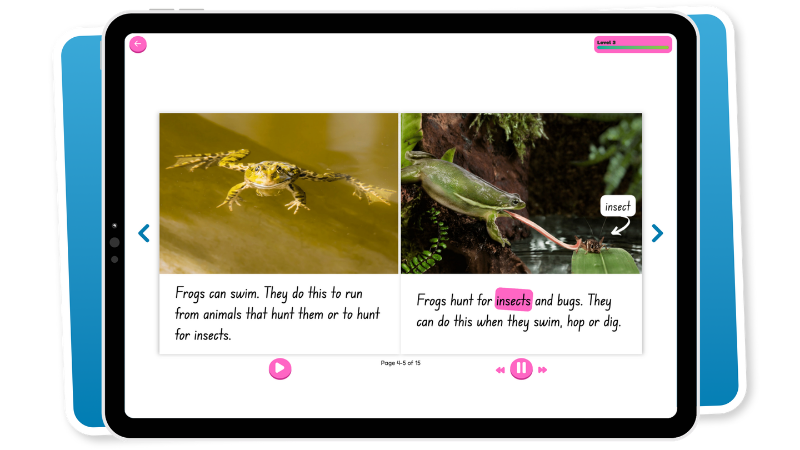
Every SuperLit book includes optional voiceover narration, with each word highlighted as it’s read aloud. This multimodal approach helps students connect written and spoken language, reinforcing phonemic awareness and improving fluency.
Voiceovers are professionally recorded and matched to your region, so students hear familiar accents and pronunciation. Whether practising independently or revisiting a text, the read-along feature builds confidence and supports a wide range of learning needs.
Pre- and Post-Reading Pages
Context, Practice, and Consolidation
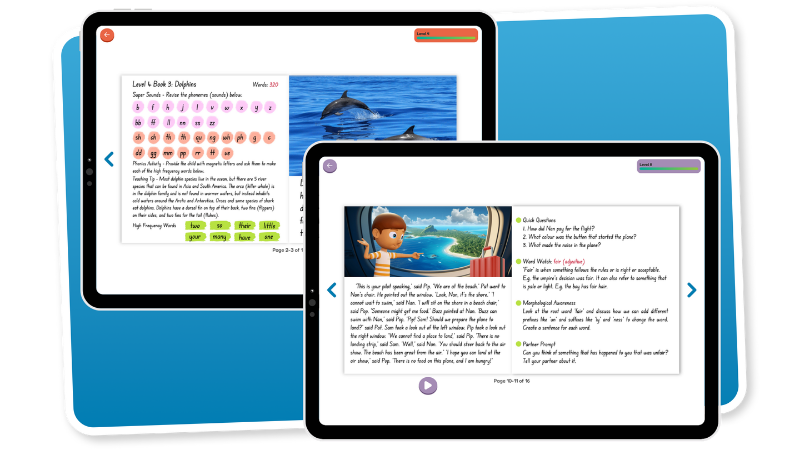
Each SuperLit book includes pre-reading pages designed to prepare students for success. These pages introduce the focus phonemes, highlight key high-frequency words, and include a simple phonics task and teaching tip to connect with prior learning.
Post-reading pages provide quick, purposeful activities to reinforce what’s been taught. Students reflect on comprehension questions, practise vocabulary and morphology, and engage in partner prompts, making it easy to consolidate skills without extra planning.
Printable Worksheets
Reinforce Skills with Targeted Practice
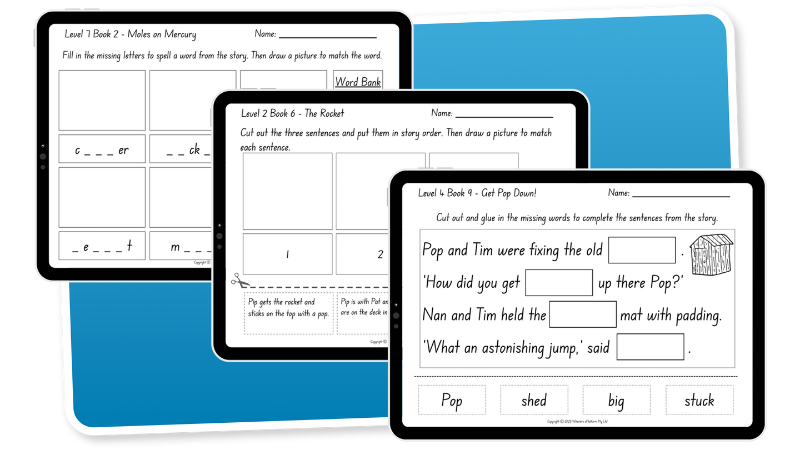
Every book comes with a downloadable worksheet that reinforces the focus phonics skill for that title. Designed for quick and effective use, they’re ideal for classwork, homework, or intervention, with no extra prep required.
The worksheets target decoding, encoding, and comprehension, giving students another opportunity to practise the skills introduced in the book. They’re perfect for guided reading rotations, early finishers, or home reinforcement.
Interactive Listening Game
Make Practice Fun and Memorable
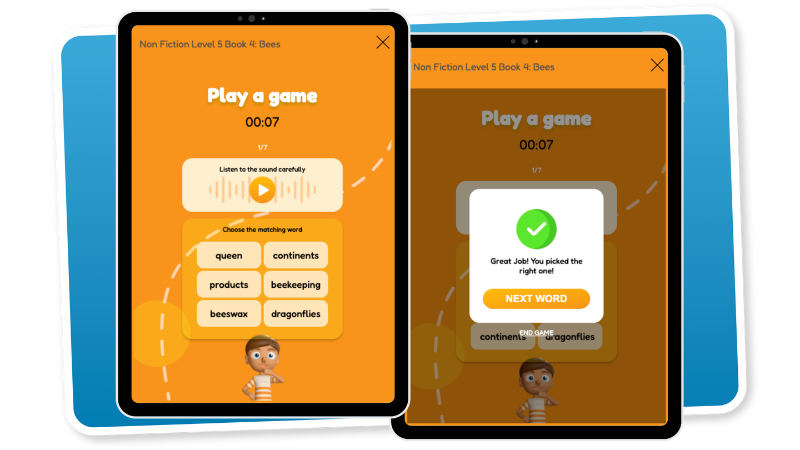
Each SuperLit title includes a short digital game designed to reinforce the phonics skills taught in the book. These interactive games help students practise sound recognition, blending, or word building, with immediate feedback to support learning.
Games are engaging, repeatable, and self-paced, making them ideal for individual practice, literacy rotations, or as a quick informal assessment. It’s phonics practice without the paperwork, keeping students motivated and on track.
Also Available in Print
Flexible for Classroom and Take-Home Use
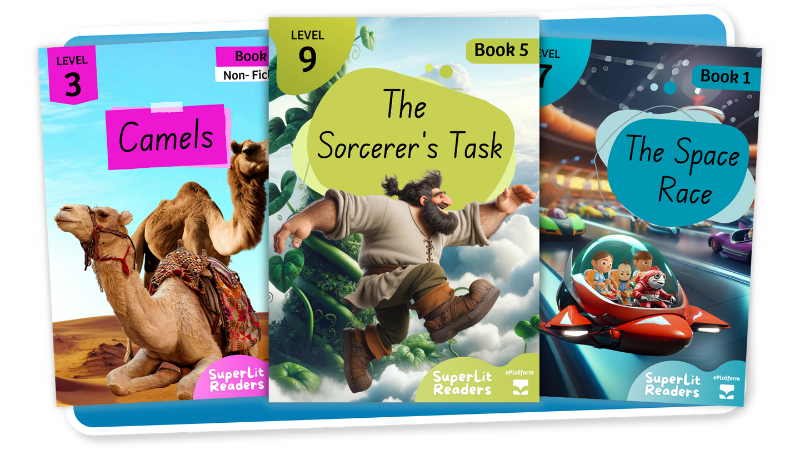
Prefer to blend digital and print? The full SuperLit Readers program is also available in print. Books match their digital counterparts exactly, including the sequence, content, and accompanying resources, making it easy to transition between formats.
* Currently only available in Australia and New Zealand
Built-in Teacher Tools
Assign, monitor and manage with ease
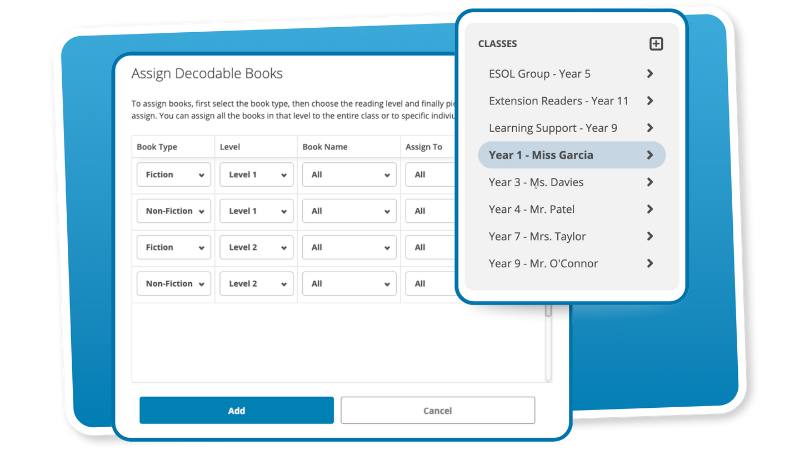
ePlatform includes integrated teacher tools that make the SuperLit Readers program simple to manage. Teachers can assign books to individuals, groups, or entire classes in just a few clicks. Real-time data shows which titles have been opened and how much has been read, helping track progress and support accountability. With full control over content access, teachers can deliver structured reading support that’s both measurable and manageable.
See Decodables in Action
Get a tailored demo of our Decodable Readers
Want to explore how our Decodable Readers can work in your school? Book a free demo to see how ePlatform supports your staff, engages your students, and simplifies digital reading for everyone.

Frequently Asked Questions
SuperLit Readers is Aligned With Synthetic Phonics
The SuperLit Readers phonics program is built on a clear scope and sequence that aligns with systematic synthetic phonics. While specific curriculum alignments can vary by region (e.g., Australian Curriculum, Common Core in the US, Letters and Sounds in the UK), its structured approach to teaching phoneme-grapheme correspondences makes it highly compatible with any curriculum that emphasises explicit and systematic phonics instruction. Its 10 structured levels are designed to fit seamlessly into diverse learning environments globally.
if you would like more information on how SuperLit Readers may align with your curriculum, Contact Us.
All Phonics Resources Are Included
SuperLit Readers comes with a comprehensive suite of accompanying resources designed to reinforce learning and support teachers. For each book, the program provides pre- and post-reading pages to prepare students and consolidate skills, alongside printable worksheets for quick and effective practice targeting decoding, encoding, and comprehension. To make practice fun, there is also an interactive listening game for each title that reinforce phonics skills with immediate feedback and can be used as an informal assessment tool. Furthermore, every book features voiceover narration and guided read-along where each word is highlighted as it's read aloud, effectively connecting written and spoken language; students can even click on individual words to hear them sounded out phonetically.
The SuperLit Readers Program is Available in Print
Yes, the full SuperLit Readers program is also available in print format, offering schools the flexibility to blend digital and physical resources. The printed books precisely match their digital counterparts in content, sequence, and accompanying resources, ensuring a seamless transition between formats. This option provides flexibility for classroom use, take-home reading, and situations where a physical book is preferred. (Note: Availability of print versions may vary by region, currently available in Australia and New Zealand).
You're viewing our website for: Greece
Switch to the United States siteTry ePlatform for Free
Explore our digital library, student tools, and admin features in a guided demo for your school.
Have questions? Check out our FAQ, or Contact Us. We’re here to help.
You're viewing our website for: Greece
Switch to the United States siteTry ePlatform for Free
Explore our digital library, student tools, and admin features in a guided demo for your school.
Have questions? Check out our FAQ, or Contact Us. We’re here to help.