
Monthly Additions Voting System: Shape Your Shared Collection
by ePlatform Collection Management | Okt 14, 2025 | Categories : Americas Asia AU & NZ Articles News Tips and Tricks UK & Europe
Estimated reading time: 7 minutes | Last updated: October 2025
Shared Collections on ePlatform give schools instant access to thousands of eBooks and Audiobooks, carefully curated to provide quality reading options for every student.
Previously, schools could request new titles to be added to their Shared Collection by emailing the ePlatform team or submitting a title request form. It worked, but it also meant extra admin, longer turnaround times, and no visibility into what other schools were asking for.
To make this process easier, faster, and more collaborative, ePlatform has introduced a new feature called Monthly Additions.
The Monthly Additions Voting System allows schools to suggest and vote on titles directly inside ePlatform, helping shape what is added to their Shared Collection each month.
This article explains what the new Monthly Additions feature is, who can use it, and how to start suggesting and voting on titles, so your school can play an active role in building a collection that reflects what your readers want most.
Key Takeaways
- Monthly Additions is a new feature inside ePlatform that lets schools suggest and vote on titles to be added to their Shared Collection each month.
- Schools can suggest up to 10 titles at a time and vote on unlimited titles added by others in their Shared Collection.
- Voting closes on the last day of each month, and the top 10 titles are added at the start of the next month.
- Only staff and admin users with Shop access can view, suggest, or vote on titles. Students cannot access this feature.
Table of Contents
- What Is the Monthly Additions Voting System
- Who Can Use the Monthly Additions Voting System?
- Key Details to Know
- How to use the Monthly Additions Voting System
- FAQs
- Final Thoughts
What Is the Monthly Additions Voting System?
The Monthly Additions Voting System is a new feature inside ePlatform that gives schools a direct voice in shaping their Shared Collection.
Each month, schools can suggest titles they would like to see added and vote on suggestions made by other schools in the same Shared Collection. The process takes place entirely within the ePlatform portal, keeping everything simple and transparent.
At the end of each month, voting closes and the top 10 titles for each format (eBook or Audiobook) are reviewed and added to the Shared Collection at the start of the next month.
This system replaces the old email and form-based request process with an in-platform experience that saves time and encourages collaboration between schools. By keeping everything inside ePlatform, schools save time and can work together to build collections that truly match what their students want to read.
Who Can Use the Monthly Additions Voting System?
The Monthly Additions Voting System is available to staff and admin users who have Shop access within ePlatform.
These users can browse suggested titles, submit new ones, and vote on options that other schools in their Shared Collection have proposed. Access is typically given to school librarians, digital resource managers, or administrators responsible for managing their school's eBook and Audiobook collections.
Students do not have access to the Monthly Additions feature. All voting and suggestions happen within the Shop area of ePlatform, keeping the process focused on educators and library teams.
Each school can have up to 10 active suggestions at any one time, but there is no limit on voting. This ensures every school can take part in shaping their Shared Collection, regardless of size or budget.
Key Details to Know
Before you start using Monthly Additions, it helps to understand a few key details about how this new feature works.
Suggestions and votes are per Shared Collection
If your school belongs to more than one Shared Collection, such as Primary eBooks and Primary Audiobooks, you can suggest and vote on titles specific to each Shared Collection.
When you make a suggestion, you will be asked to select which Shared Collection you are suggesting it for. You can only suggest titles for the Shared Collections your school is a member of. Suggestions and votes are kept separate for every collection, so results always reflect the interests of that specific group of readers.
Voting is counted per school portal
Votes are recorded at the school level, not per individual staff member.
If multiple people at your school have Shop access, their votes all feed into the same school account. When one staff member changes a vote, the overall school vote updates automatically.
This approach ensures fair representation between schools that have larger library teams and those with only one or two staff managing their school's digital library.
How to Use the Monthly Additions Voting System
The Monthly Additions Voting System is built directly into the Shop area of ePlatform. Everything happens inside your existing staff account, making it quick and easy to suggest titles, vote on books, and track new additions.
Below is a step-by-step guide explaining where to find the feature, how to use it, and how to stay up to date each month.
Where to Find Monthly Additions in ePlatform
- Log in to your schools ePlatform portal with a staff or admin account that has Shop access.
- Open the Shop in the top navigation.
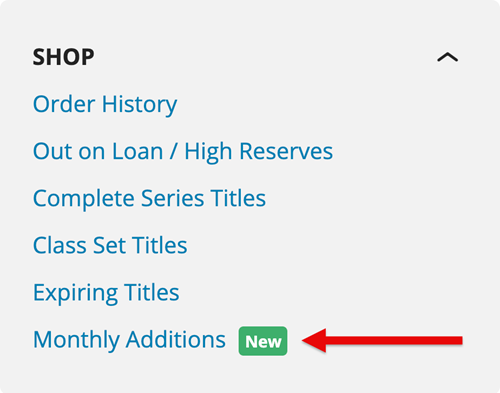
- From the left sidebar, click Monthly Additions.
You will see three tabs:
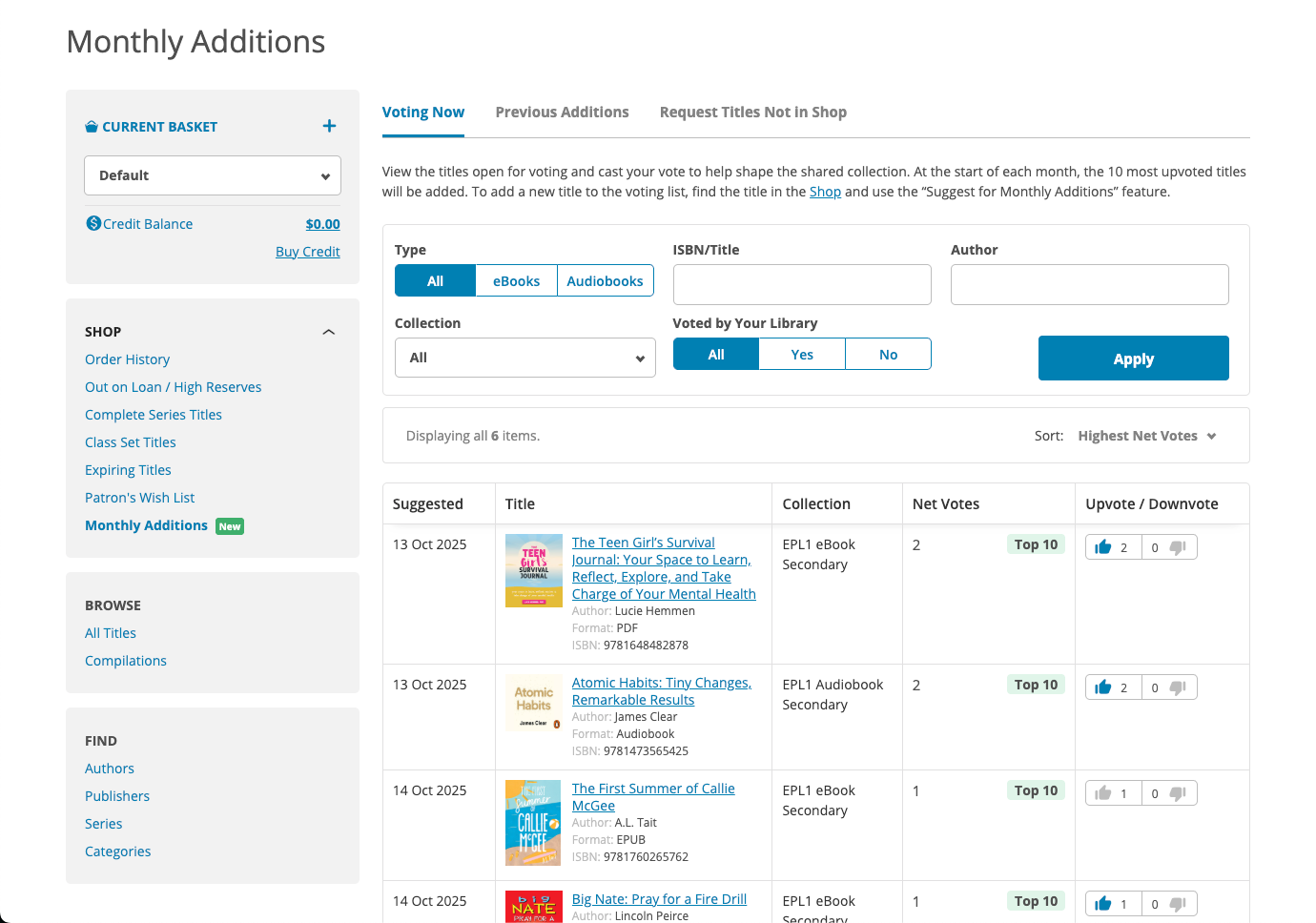
- Voting Now: Browse and vote on suggestions made by schools in your Shared Collection.
- Previous Additions: See what has been added from recent voting months.
- Request Titles Not in Shop: Ask ePlatform's selector team to check with the publisher regarding availability of a title that is not currently available in the Shop. (Note: Some titles are not available in the Shop due to publisher restrictions or exclusive rights held by another service).
How to Suggest a Title for the Monthly Additions Voting System
When you find a book in the Shop that isn’t yet in your Shared Collection, you can suggest it for Monthly Additions in just a few clicks.
- Go to the Shop in your ePlatform portal.
- Browse or search for the title you want, click it.
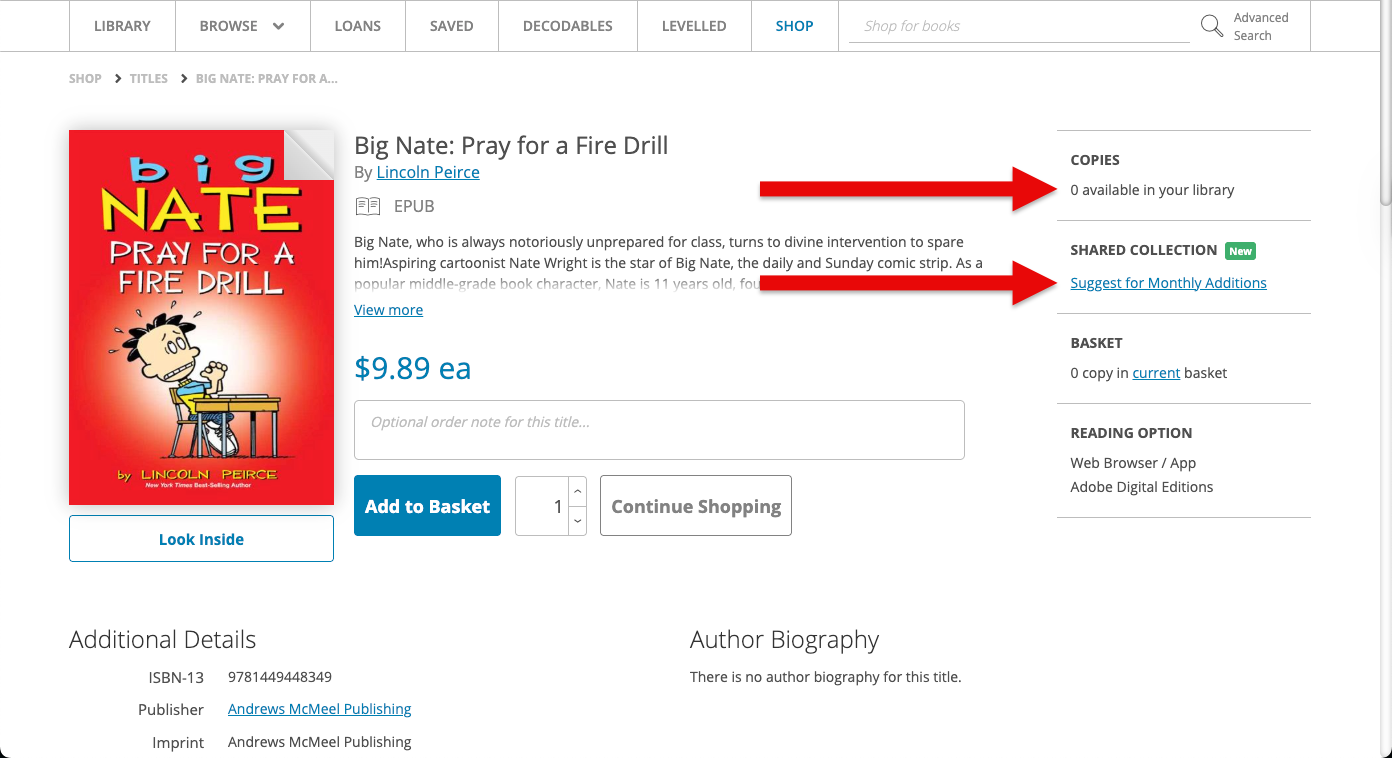
- The title screen will show the number of copies available. If 0 copies are available, you will see an option to "Suggest for Monthly Additions", click this.
- Confirm the details of the title are correct and select which Shared Collection you would like to suggest it for, click submit
Once you suggest a title, it will appear in the Voting System tab for your Shared Collection. Other schools within the same Shared Collection can now view your suggestion and vote for or against it.
Each school can have up to ten active suggestions at one time. If one of your suggested titles gets added to the Shared Collection or removed from voting, you can suggest another in its place.
This process keeps things simple and transparent, allowing every school to contribute ideas that benefit the wider community of readers.
How to Vote on Titles
Voting is the core of the Monthly Additions feature. It allows schools to have a direct say in which eBooks and/or Audiobooks are added to their Shared Collection each month.
- Go to Shop → Monthly Additions → Voting System.
- You’ll see all the titles suggested by schools in your Shared Collection.
- Use the upvote or downvote buttons beside each title to share your preference.
There is no limit to how many titles you can vote on. All votes contribute to the final monthly ranking, which determines which titles are added next.
Voting closes at 11:59 pm on the last day of each month. After voting closes, the ePlatform team reviews the results and adds the top 10 titles with the most net votes (upvotes minus downvotes) for eachShared Collection at the start of the following month.
You can return to this section at any time during the month to update your votes or see how the list is progressing.
How to Suggest a Title Not Found in the Shop
If you cannot find a specific title in the Shop, you can still request it inside your ePlatform portal.
- Go to Shop → Monthly Additions → Request Titles Not in the Shop.
- Provide the book details like Title, Author, ISBN and format.
Once submitted, ePlatform’s selector team will check with the publisher to see if the title can be sourced and made available for voting in the future.
Some titles are not listed in the Shop due to publisher restrictions or exclusive rights held by another service. While not all titles can be licensed, every request is reviewed by the ePlatform team.
This process helps identify high-demand or niche titles that schools are interested in, which may become available in the Shop later.
How to View Previous Monthly Additions
Once voting closes, the top titles are added to your Shared Collection. You can view these results anytime in the Previous Additions tab.
- Go to Shop → Monthly Additions → Previous Additions.
- Browse the list of titles that have been added from previous months.
- Each title includes full details such as author, publisher, and format, so you can quickly find and borrow them.
This tab helps schools keep track of what is new in their Shared Collection. It is also a useful place to explore trending titles that other schools in your region have voted for.
Checking this list regularly is the best way to stay up to date with the latest eBooks and Audiobooks added to your collection.
FAQs
What is ePlatform's Monthly Additions Voting System?
It’s a feature that lets schools suggest and vote on eBooks and Audiobooks from the Shop to be added to their Shared Collection each month. The top-voted titles are reviewed and added at the start of the next month.
Can students use the Monthly Additions Voting System?
No. The Monthly Additions Voting System is only available to staff and admin users who have Shop access. Students cannot see or interact with this feature.
How many titles can my school suggest?
Each school can have up to 10 active suggestions at a time. You can remove a suggestion or wait until one of your current suggestions is added before suggesting another.
Can we vote on titles suggested by other schools?
Yes. All schools within the same Shared Collection can vote on each other’s suggestions. This ensures that every school has an equal say in what gets added next.
When does voting close and when are new titles added?
Voting closes at 11:59 pm on the last day of each month. After voting ends, ePlatform’s selection team reviews the results and adds the top 10 most-voted titles for each format and region at the start of the following month.
What happens if a suggestion doesn’t receive enough votes?
If a suggestion doesn’t receive enough votes to make the top 10, it simply stays on the voting list for the next month. Titles can continue gathering votes over time, so even smaller or niche picks still have a chance to be added later.
Can we suggest titles that are not in the Shop?
Yes. If a title is not available in the Shop, you can fill out the short request form inside the Monthly Additions section. The ePlatform team will check with the publisher to see if it can be sourced.
Final Thoughts
The Monthly Additions Voting System was created to make Shared Collections more dynamic, transparent, and community-driven.
By giving schools the ability to suggest and vote on titles directly inside ePlatform, the process is now faster, simpler, and more collaborative than ever before.
Every vote helps shape the future of your Shared Collection. The more your school participates, the more engaging and relevant your digital library becomes. Log in to ePlatform today, navigate to Monthly Additions area, and start suggesting and voting on titles.