
Accelerated Reader & eBooks: How to Integrate Them Seamlessly
by ePlatform Collection Management | Ene 21, 2026 | Categories : Americas Asia AU & NZ Articles Tips and Tricks UK & Europe News
Estimated reading time: 6 minutes | Last updated: January 2026
For many school libraries, Accelerated Reader (AR) is the backbone of literacy engagement. It provides the structure needed to set goals and the data required to track student progress. However, limiting your Accelerated Reader program to the physical shelves often creates unnecessary bottlenecks. Students are restricted to library opening hours, and they often struggle to find books that match their specific levels amidst the busy shelves.
By integrating Accelerated Reader with your ePlatform digital library, you can remove these barriers. This guide explores how to seamlessly connect the two systems to boost engagement and make your life as a librarian a little easier.
Key Takeaways
- Hybrid Flexibility: Combining physical books with eBooks allows for a flexible Accelerated Reader program that works at school, at home, and over the holidays.
- Automated Metadata: Digital integration eliminates the administrative headache of manual labelling and sticker management.
- Privacy & Confidence: eBooks allow reluctant readers to engage with texts at their actual reading level without the social anxiety of peer judgment.
- Smarter Search: Dedicated filters allow students to find "just right" books by ATOS level, Points, and Interest Level instantly.
Table of Contents
- Can You Use Accelerated Reader with eBooks?
- The Challenge: Matching eBooks & Audiobooks to Reading Levels
- Benefits of a Hybrid Accelerated Reader Approach
- What the Integration Looks Like (Student View)
- Integration Overview: Technical Setup
- FAQs
- Final Thoughts
Can You Use Accelerated Reader with eBooks?
The short answer is yes. A common misconception is that Accelerated Reader is strictly for physical books, but the program is designed to test reading comprehension, regardless of the medium. Whether a student is turning a physical page or swiping on a tablet, the cognitive process of decoding and understanding the narrative remains the same.
What about Audiobooks?
Many educators ask us if audiobooks are "valid" for Accelerated Reader. While policies vary from school to school, the general consensus is shifting. Audiobooks are increasingly viewed as a vital tool for accessibility rather than a "shortcut."
Integrating Accelerated Reader with your audio collection allows students with dyslexia, visual impairments, or processing difficulties to access the same rich stories as their peers. They listen to the text to aid comprehension and then take the standard quiz to verify their understanding. It’s an inclusive approach that ensures every student can contribute to their reading goals.
The Challenge: Matching eBooks & Audiobooks to AR Reading Levels
Any librarian who has managed an Accelerated Reader collection knows the administrative burden is real. In a physical library, you are often stuck manually checking ISBNs, printing thousands of colour-coded labels, and sticking them onto book spines. And that’s before the stickers start peeling off or books go missing.
The Digital Solution
eBooks eliminate this manual work entirely. With ePlatform’s seamless integration with Accelerated Reader, the metadata does the heavy lifting for you. When we add new titles to your collection, the Accelerated Reader data—including Quiz Numbers, Point Values, and ATOS Levels—is populated automatically. You do not need to lift a finger (or a label maker), ensuring your catalogue is always up to date and ready for browsing.
Benefits of a Hybrid Accelerated Reader Approach
Moving to a hybrid model where students can read both print and digital formats isn't just about convenience; it offers distinct strategic advantages for your school's literacy program.
Removing the "Stigma" of Low Levels
One of the silent challenges in reading programs is peer pressure, particularly in secondary schools. A student reading below their grade level might feel embarrassed to be seen carrying a physical book clearly labelled with a "lower years" sticker. This "sticker stigma" often leads them to choose books they cannot comprehend just to fit in, resulting in frustration and failed quizzes.
eBooks offer a private reading experience. A student can borrow a book at their specific level and read it on their device without their peers ever knowing the difficulty level. This privacy builds confidence and encourages honest engagement with the program.
Preventing the Weekend Reading Dip
We often see a drop in reading engagement over weekends and holidays simply due to a lack of access. Physical library books might be left in lockers, finished too quickly, or forgotten at school.
Your digital library, however, never closes. By mapping your eBooks to the Accelerated Reader program, you give students access to "just right" books at 7 PM on a Tuesday or during the summer holidays. They can read at home and be ready to take their quiz the moment they walk into class.
What the Accelerated Reader Integration Looks Like on ePlatform
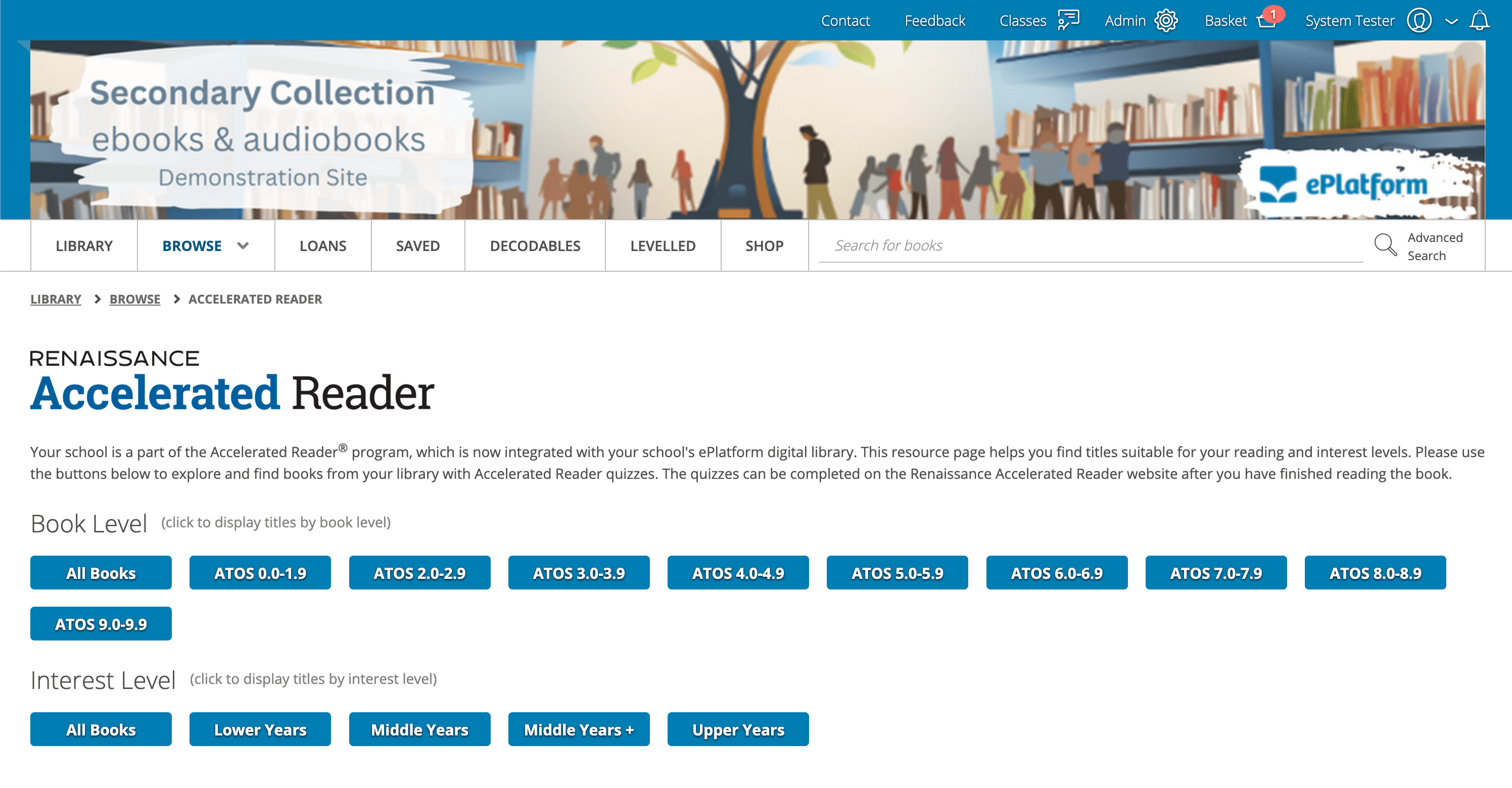
The integration creates a dedicated Accelerated Reader Resource Page within your ePlatform digital library. This isn't just a list of books; it's a space with your school's portal designed to help students find titles suitable for their specific reading and interest levels.
Visual Browsing
Students are presented with an intuitive interface where they can browse via quick-access buttons. For example, a student looking for a specific challenge can click "ATOS 4.0-4.9" to see all relevant titles immediately. They can also filter by Interest Level, such as "Lower Years" or "Middle Years," ensuring the content is age-appropriate regardless of the reading difficulty.
Advanced Filtering
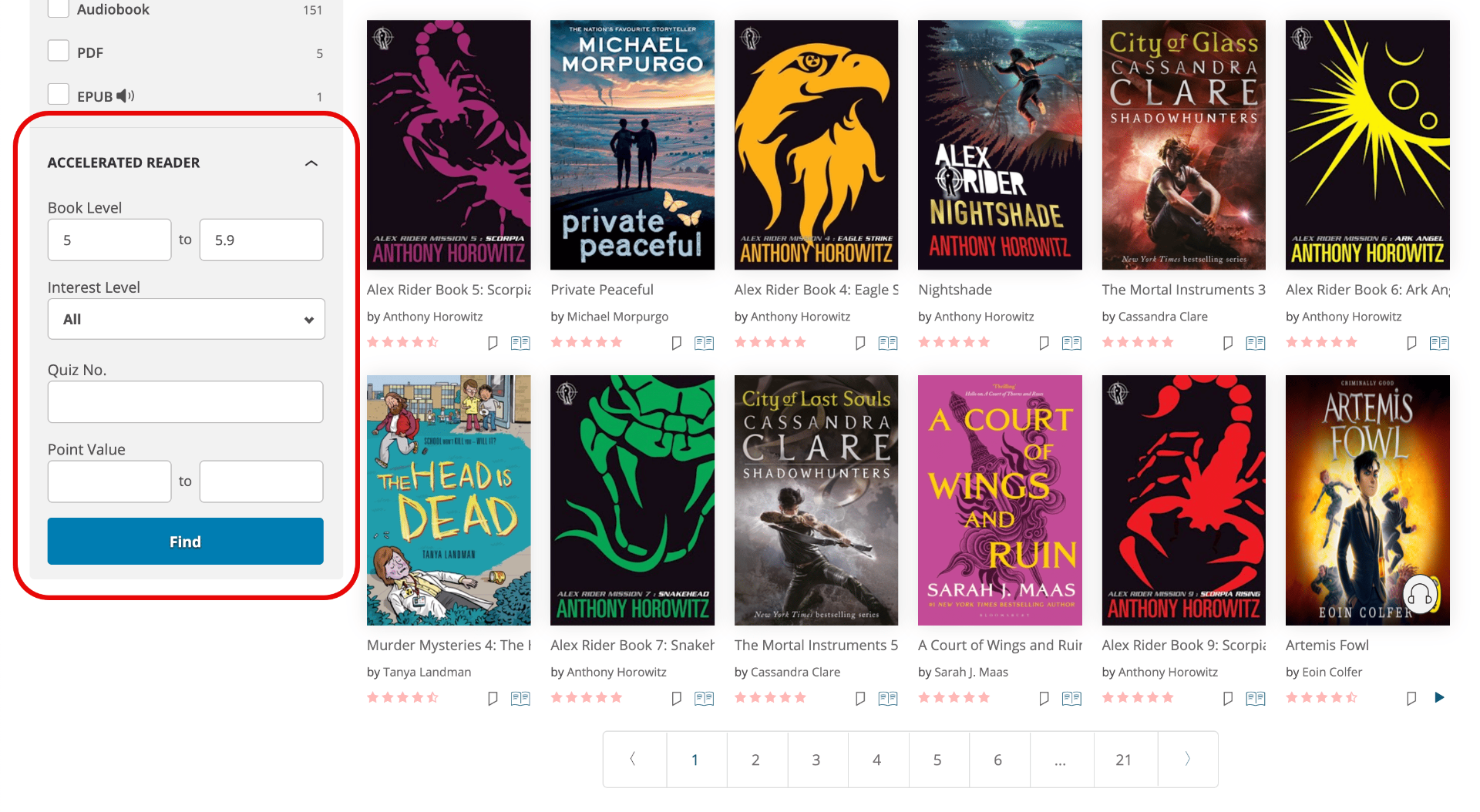
For more specific searching, the integration adds a powerful sidebar filter. Students can input an exact Quiz Number if a teacher has assigned a specific book, or filter by Point Value to find a book that helps them hit their term targets. This ensures students spend less time searching and more time reading.
Accelerated Reader Integration Overview: Technical Setup
If you are already an ePlatform customer, you likely have this capability waiting to be switched on. The integration works by matching the ISBNs in your digital collection with the Renaissance Learning database to pull in the relevant metadata.
Important Note: ePlatform provides the content and the search tools. As stated on the resource page, the quizzes themselves are completed on the Renaissance Accelerated Reader website after the student has finished reading.
Ready to start? View the technical steps in our guide on Enabling Free Accelerated Reader Support in your ePlatform.
FAQs
Is the Accelerated Reader integration with ePlatform free?
Yes. If you have an active ePlatform subscription, the ability to display Accelerated Reader metadata is a standard feature included at no extra cost. Contact us to enable it for your school.
Can students take AR quizzes inside ePlatform?
No. ePlatform helps students find books that match their level. Once they finish reading, they will still log in to the Renaissance/Accelerated Reader portal to take the actual quiz.
Do audiobooks count towards Accelerated Reader goals?
This is a school-level decision, but generally, yes. Many schools encourage the use of audiobooks for students who need reading support. Since the quiz tests comprehension of the story, listening to the book is a valid way to consume the content.
How do students find books by their AR level?
Students can use the dedicated Accelerated Readers Page on ePlatform which displays buttons for different ATOS levels (e.g., 3.0-3.9). Alternatively, they can use the sidebar filter on the Browse page to enter a specific Quiz Number or Point Value range.
Final Thoughts
Technology shouldn’t complicate literacy; it should facilitate it. By blending the pedagogical structure of Accelerated Reader with the flexibility of ePlatform’s digital collection, you create a reading environment that is accessible, private, and available 24/7.
If you are ready to boost your reading rates, switch on the Accelerated Reader integration today, or contact our support team if you need assistance getting started.